Your new laptop is (probably) wasting hardware
A lot of new laptops are marketed with a NPU or, AI Chip.
Mine has one, and like everyone i had no idea what to do with, until i came across a blog, i spent almost 3 days fully understanding this article, learning parts of computer architecture, memory architecture (check references). I feel that there is a need to make use of this hardware, because you paid for it.
From what i understood, the reasons/arguments for why NPUs are not utilized completely — its too task specific (true), its too hard to setup/configure(also true) and most NPU toolchains (like FastFlowLLM for amdxdna1) no longer provide active support to legacy (not really legacy, only 3 years old), maybe because its too slow.
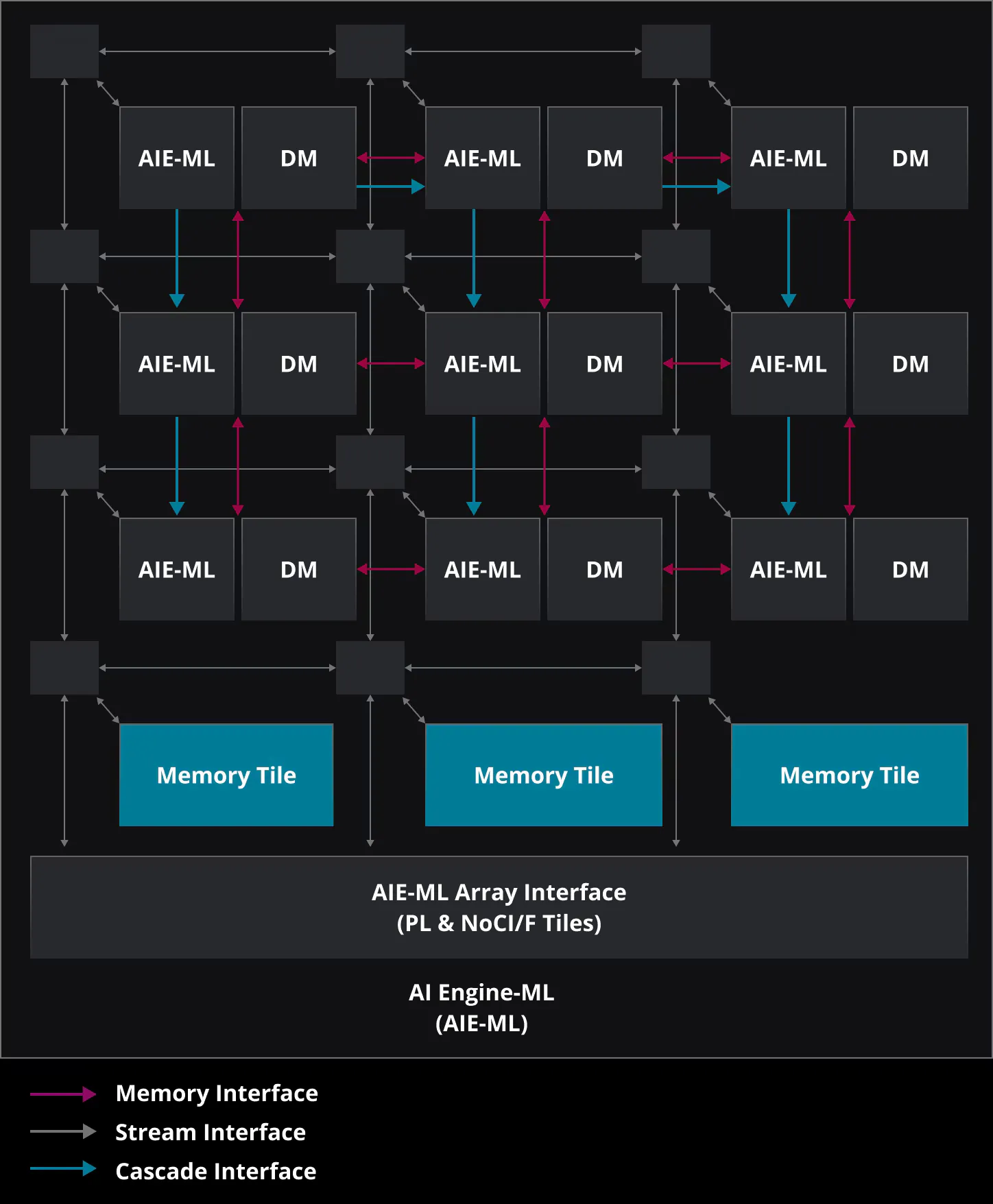
This blog is me documenting my journey from not knowing what an NPU is to writng and debugging a kernel for similarity search for w2vgrep like workload, which involved — setting up the driver, the toolchain, the compiler tool chain, the higher level compiler tool chain, and then writing/improving matmul kernels.
Discovering how to use the NPU
There is a lot to rant in this section, i spent a lot of time figuring out how to get the xdna-driver and xrt runtime working, made two PRs fixing the build scripts and limitMEMLOCK problem on the way. I’ll try to keep this short.
Set up the drivers and xrt from source -> set up the MLIR-AIE / IRON tool chain -> Look at already existing kernel sources like mlir-aie programming examples.
The main issue with my XDNA1 NPU is that its not supported by tools like FastFlow LM/ Lemonde Server (which got merged into AMD), so i had no way to simply do ollama run gemma-4b
The whole first NPU program / kernel pipeline looked like this
example.py ↓ IRON ↓ MLIR ↓ Peano ↓ XCLBIN ↓ pyxrt ↓ NPU
The first step was to learn how the whole tool chain works, what a kernel is and how to write one. I used this Official Guide to do so.
I started from the single core matmul and spent next 3 weeks or so learning how to write kernels, what MLIR is, how an NPU runs these kernels.
In this period i went a little off track — played with a esp32-s3, wrote a chess engine in c (improving it) which resulted in the delay.
Choosing the workload
“It’s not worth the effort for the perfomance” — one of the arguments I kept running into when looking at XDNA1 support and the possibly the reason it wasnt included in the later versions of the toolchain, i disagree, its wasting space.
I choose the simplest workload, semantic retrieval - It’s basically a large matrix multiplication followed by a top-k, which gives the NPU a lot of regular, parallel work to chew through.
I used two datasets to test two different shapes of this workload: a large batch-oriented vector search using Cohere-1M (1M 768D vectors, 512 supplied queries and ground-truth results), and a more realistic interactive search using 224,482 Simple English Wikipedia articles, embedded locally with all-MiniLM-L6-v2 (on the cpu, i plan to run all ops on the npu in the future) into 384D vectors.
Workload A: batch throughput: 512 × 768D queries against 1M vectors. This is the kind of workload you’d see in offline retrieval, recommendation pipelines, bulk document matching, or embedding evaluation.
Workload B: single query: one natural-language query embedded into 384D, searched against 224,482 article vectors. This is closer to semantic search, RAG retrieval, document search, or an interactive search box.
The first attempt
I started with the simplest possible implementation: a single AIE core (single core matmul kernel), small query batches, and repeated corpus chunks. It was correct, but painfully inefficient. With just 32 queries, the CPU took 1.094 s while the NPU took 34.608 s. More importantly, the NPU was being hit with 1,956 dispatches.
making it less terrible
The first version was 7.3× slower than the CPU, so there was clearly some low-hanging fruit.
1. Actually use the NPU
The first kernel only used a single AIE core. That was a little embarrassing considering the whole point of this exercise was to use the accelerator.
I switched to AMD’s 16-core matrix multiplication kernel and spread the computation across a 4×4 partition of the XDNA1 array. It helped, but not nearly enough. At 256 queries, the NPU still took 9.261 seconds compared to 5.970 seconds on the CPU.
So the problem wasn’t simply that I wasn’t using enough cores.
2. Give each dispatch more work
The next problem was how often I was talking to the NPU.
The million-vector corpus was being split into 2,048-vector chunks, which meant 489 dispatches for the benchmark. I increased the corpus chunk size to 8,192 vectors, bringing that down to 123 dispatches.
The NPU went from 9.261 s to 7.484 s. A 19.2% improvement just from making each trip to the accelerator do more work.
This was starting to make the problem obvious: the NPU wasn’t particularly bad at matrix multiplication. I was just spending too much time asking it to do small amounts of it.
3. Stop moving and preparing the same data
There was still work happening before the matrix multiplication even started.
I normalized the corpus once and cached it instead of doing it for every query batch. I also built a row-major BF16 cache in the layout expected by the kernel, removing the per-call transpose and BF16 conversion. Query and output buffers were reused across corpus chunks instead of being repeatedly allocated.
But the biggest win came from reusing the XRT input buffer itself.
Input staging had been taking 3.074 seconds. After reusing the buffer, it fell to 0.305 seconds. At this point the NPU finally had a chance to spend more of the benchmark actually computing rather than shuffling data around.
4. Then I accidentally started optimizing the CPU
The NPU wasn’t the only thing wasting time.
The scores from each corpus chunk still had to come back to the host and go through a top-k merge. NumPy’s argpartition was surprisingly expensive for the 512 × 8,192 score blocks, so I switched to torch.topk with eight threads.
The merge went from 1.078 seconds to 0.047 seconds — a 22.9× reduction. It wasn’t an NPU optimization at all, but it was part of the end-to-end benchmark, so it counted.
After all of that, the benchmark finally stopped looking ridiculous.
CPU: 5.207 s
XDNA1: 1.551 s
3.36× faster.
The NPU result also retained 0.9844 Recall@10 against the supplied ground truth and 0.9844 top-k overlap with the CPU result, passing the quality gate.